
CheckerMelon
Scanner d'en-têtes de sécurité HTTP (OWASP) : validation des valeurs, cookies, CORS, scoring A+ à F, GUI + CLI, exports SARIF/CI.

OWASP Security Header Checker — by whackermelon, forked and heavily extended from javelinsoft’s OWASP-Security-Header-Checker-Tool.
CheckerMelon assesses the HTTP security response headers of web applications against the OWASP recommended security headers. Unlike a simple presence check, it validates header values, analyzes cookies, detects duplicate / deprecated / information-disclosure headers, and computes a security grade (A+ to F). It works from a GUI or from the command line (CI/CD friendly), and can scan pages behind authentication via custom headers or a full raw HTTP request replay (Burp-style).
Features
- Authenticated scanning: inject custom request headers (
Cookie: session=...,Authorization: Bearer ...) to test pages behind a login. - Raw request replay: paste a full HTTP request copied from Burp Suite (HTTP/1.x or HTTP/2 pseudo-headers) — method, path, headers and body are replayed as-is before analyzing the response. Combine it with the URL field to replay a production capture against a staging server.
- Value validation: not just presence — weak or misconfigured values are flagged (HSTS max-age, CSP
unsafe-inline/wildcards, X-Frame-Options, Referrer-Policy, Cache-Control, Permissions-Policy, …). - Cookie analysis: every
Set-Cookieis checked forSecure,HttpOnly,SameSiteand excessive lifetime. - CORS analysis: every target is probed with a hostile
Originheader — reflected origins, wildcard policies and dangerousAllow-Credentialscombinations are reported. - Scan history & diff: scans can be saved to a local SQLite database and the two most recent scans of a URL can be compared (
--diff) to spot regressions. - CI/CD ready: SARIF export for GitHub Code Scanning,
--fail-underpipeline gate, example GitHub Actions workflow inexamples/. - Config file & profiles:
checkermelon.tomlstores defaults and named profiles (e.g. admin/user/anonymous tokens) — seecheckermelon.toml.example. - Self-updating lists:
--update-listsfetches the latest header lists from the project repository. - Deprecated headers detection:
X-XSS-Protection,Public-Key-Pins,Expect-CT,Feature-Policy. - Duplicate header detection based on raw HTTP headers.
- Security score: A+ to F grade with penalty breakdown.
- Crawl links: parallel crawling of same-domain links, with configurable depth, workers, time budget and deduplication.
- HTTPS checks: redirect chain display and HTTP → HTTPS upgrade detection.
- Proxy support (Burp/ZAP) and optional TLS verification skip.
- Exports: CSV, JSON and HTML reports.
- CLI mode for automation/CI, including batch scanning of URL lists and a
--fail-undergate. - User-friendly GUI with filtering, counters, sorting, clipboard support, stop button and optional dark theme (install
ttkbootstrap).
Screenshots
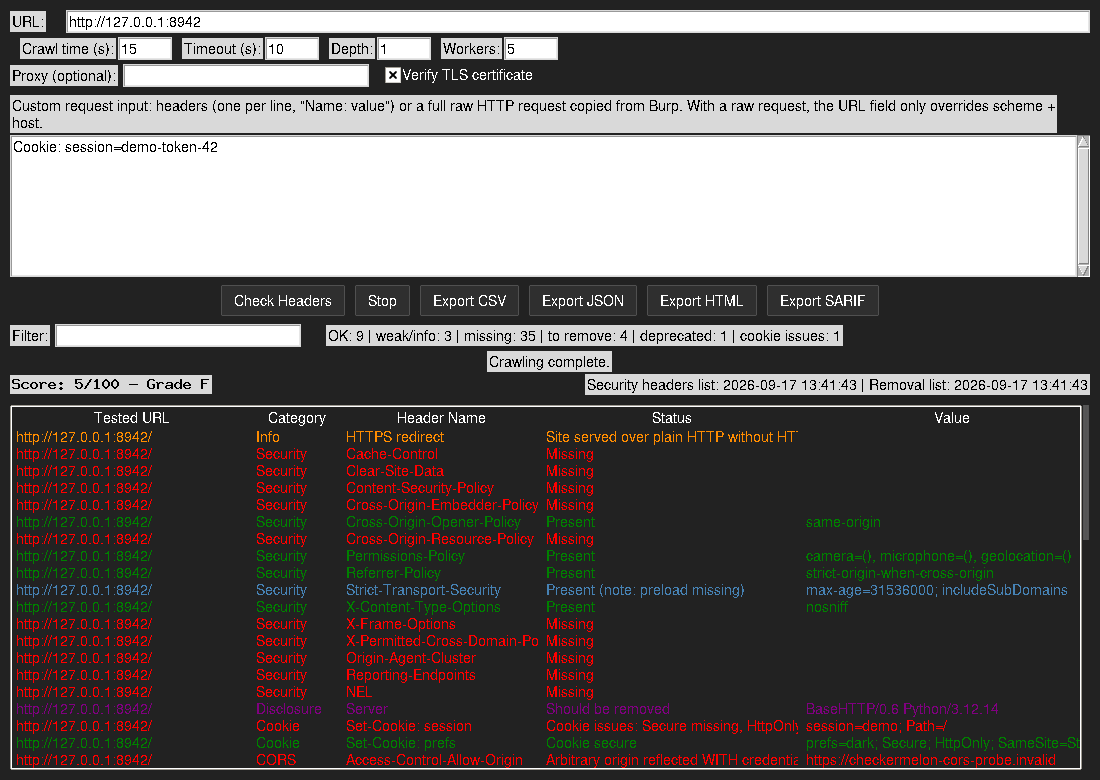
The GUI after a scan: security grade, per-category counters, color-coded results (missing headers, weak values, cookies, disclosure, CORS) and one-click exports.
Installation
git clone https://github.com/whackermelon/CheckerMelon.git
cd CheckerMelon
pip install -r requirements.txt
Optional, for a dark-themed GUI: pip install ttkbootstrap
Usage
GUI
python CheckerMelon.py-
Enter the target URL and the crawl options (time budget, timeout, depth, workers).
-
Optionally paste custom request headers, one per line, e.g.:
Cookie: session=eyJhbGciOi... Authorization: Bearer eyJhbGciOi... -
…or paste a complete raw HTTP request copied from Burp Suite:
POST /account/settings HTTP/1.1
Host: example.com
Cookie: session=eyJhbGciOi...
Content-Type: application/x-www-form-urlencoded

action=update&theme=dark
The request is replayed with its method, headers and body. If you also fill the URL field, only its scheme + host are used (e.g.
staging.example.com) so you can replay a production capture against another environment. -
Click “Check Headers”, then filter/sort the results and export them as CSV/JSON/HTML.
CLI
# Single URL, authenticated, JSON report
python CheckerMelon.py https://example.com -H "Cookie: session=abc123" --json report.json

# Replay a raw request captured in Burp (stdin also works with --request -)
python CheckerMelon.py --request burp_capture.txt
# Same capture, replayed against a staging server instead:
python CheckerMelon.py https://staging.example.com --request burp_capture.txt

# Verbose, no crawling, HTML report
python CheckerMelon.py https://example.com --no-crawl -v --html report.html

# Batch scan with a CI gate (exit code 1 if any score is below 70)
python CheckerMelon.py --batch urls.txt --fail-under 70 --csv results.csv

# SARIF export for GitHub Code Scanning (see examples/checkermelon-ci.yml)
python CheckerMelon.py https://example.com --no-crawl --sarif results.sarif

# Save the scan to the local history database, then compare scans over time
python CheckerMelon.py https://example.com --history
python CheckerMelon.py --diff https://example.com

# Use a named profile from checkermelon.toml (tokens, target, options)
python CheckerMelon.py --profile admin

# Update the header lists from the project repository
python CheckerMelon.py --update-lists

# Through Burp, ignoring its self-signed certificate
python CheckerMelon.py https://example.com --proxy http://127.0.0.1:8080 -k
Run python CheckerMelon.py --help for the full option list.
Configuration file
Copy checkermelon.toml.example to checkermelon.toml (gitignored, since
profiles typically contain session cookies or tokens). [defaults] applies to
both the GUI and the CLI, and named [profiles.*] can be selected with
--profile NAME. CLI flags always override the config file.
Configuration files
headers_add.json— the security headers to look for, with their recommended values (presence + value are checked). Refresh with--update-lists.headers_remove.json— headers that leak information and should be removed (Server,X-Powered-By, framework banners, …).checkermelon.toml.example— template for the optional config file (defaults + profiles).
Legal disclaimer
Only scan targets you own or are explicitly authorized to test. You are responsible for how you use this tool.
Contributing
Contributions are welcome! If you have suggestions for improvements or new features, please open an issue or submit a pull request.